


How to Apply for Financial Aid
Reaching your educational and career goals while maximizing your financial aid starts here. By completing these outlined steps to apply for financial aid, you can help make earning your degree more affordable. The Regent University financial aid team will work closely with you to design a package that is best for your situation, including federal, state, private and school-funded types of financial aid. Thanks to our variety of robust financial aid plans, we’re ready to lend a hand as you step into your future at Regent. Let us walk you through the financial aid application process.
Financial aid checklist
Follow The Steps To Apply For Financial Aid:

STEP 1: Complete the FAFSA
- Complete the FAFSA online and enter Regent's school code: 030913
- 4-7 business days later, Regent Financial Aid Office will receive a copy
- Next, we will send your User ID and PIN by email
It is recommended you complete the FAFSA at least 6 months prior to the start of class.

STEP 2: Fulfill Financial Aid Requirements
- Access your Financial Aid Application by logging into your Federal Student Aid account or MyRegent Account, then click Financial Aid.
- The Financial Aid Office will process your documents within 3-5 business days.
Federal student loan borrowers must complete the Entrance Counseling and Master Promissory Note (MPN). Have you completed them yet?

STEP 3: Review & Accept Your Awards
Payment Options:
- Federal Aid
- Institutional Aid
- State Grants
- Privately Funded
- Tuition Installment Plan
- Military Benefits
Follow the steps on accepting your awards offers here.

STEP 4: Complete Semester Check-In
Log in to MyRegent Portal and click on the Semester Check-in banner on your homepage.
- Confirm final course schedule
- View any bookstore credits
- Review final account balance or refund
- Finalize payment arrangement
Financial Aid refunds are disbursed 17 days after the first day of class.
Completing the Free Application for Federal Student Aid (FAFSA) is the most important step for many students as they create their financial readiness plan. The FAFSA reviews household income, available assets, and overall household size to create a need assessment that is unique to you. This is sent to your school of choice and used to determine eligibility for multiple types of aid. The FAFSA can be completed in three easy steps and generally takes most people less than one hour.
- Create a FAFSA Login (FSA ID)
- Collect the documents you will need
- Complete the application at fafsa.gov
Your FAFSA results will be sent to Regent as long as you provide our school code (030913). The Department of Education provides more information regarding the FAFSA here.
Priority Deadline: Regent University does not impose a FAFSA priority deadline, however we do recommend that students who wish to pursue federal aid submit their FAFSA at least two months prior to the payment deadline. It is normal for some FASFA applications to require additional student paperwork with the institution and early submission allows the student time to understand, collect, and submit any follow up document items needed. Students will receive an email once their FAFSA is received to guide them to their next steps in the application process.
Contact Information:
Admissions - Phone: 757.352.4127 | Email: admissions@regent.edu
Advising & Financial Aid - Phone: 757.352.4385 | Email: advising@regent.edu | finaid@regent.edu
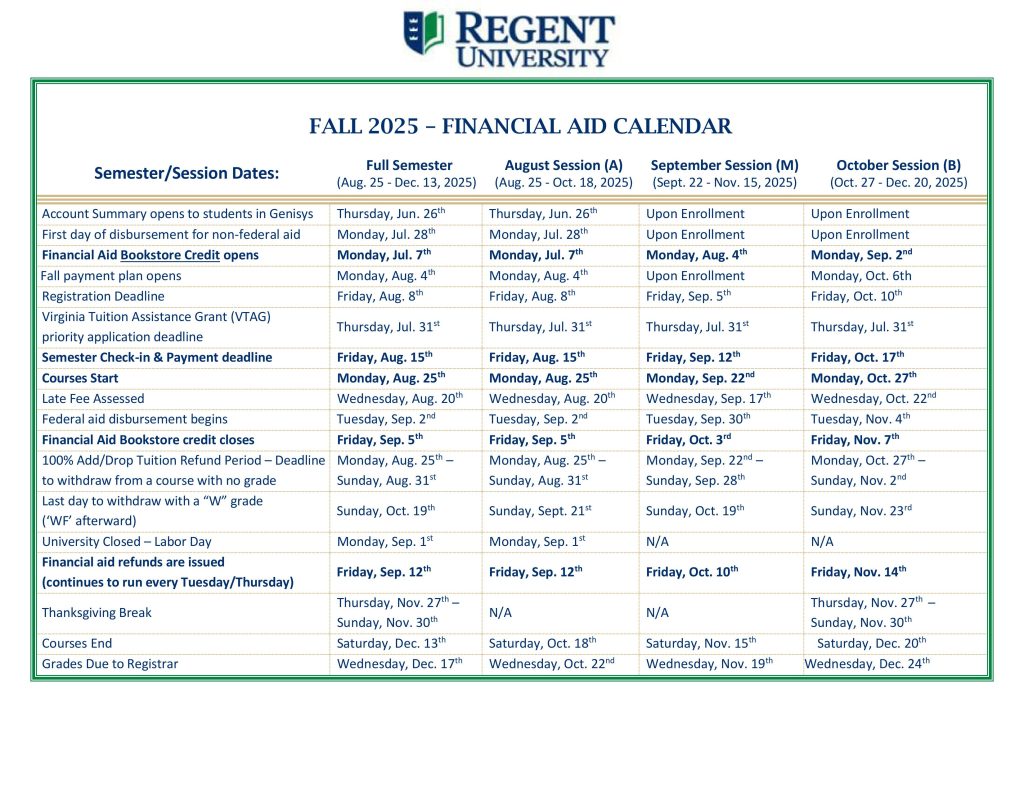
Please select the semester and session start date that is applicable to your enrollment plans.
Attention: Financial aid refunds are issued after the 100% add/drop period, approximately 17 days after the first day of class.


FAFSA AID – FREE APPLICATION FOR FEDERAL STUDENT AID
Submitting the FAFSA on the web is the fastest way to apply for federal student aid. You will get your result 7 to 14 days faster than if you mail in a paper application. This page has been designed to help you in understanding FAFSA and submitting the FAFSA on the web. Please read the tips before you submit the FAFSA on the web. You can connect to the FAFSA on the web at the bottom of this page. Regent University’s FAFSA school code is 030913.
Priority Deadline: Regent University does not impose a FAFSA priority application deadline, however it is recommended that students who wish to pursue federal aid submit their FAFSA at least two months prior to the payment deadline. It is normal for some FASFA applications to require additional student paperwork with the institution and early submission allows the student time to understand, collect, and submit any follow up document items to complete their application. Students will receive an email once their FAFSA is received to guide them to their next steps in the application process.
All students filing out a FAFSA on the web need to first request an FSA ID. The FSA ID is the identifier to let you access personal information in various U.S. Department of Education systems. The FSA ID is required to submit the online Renewal FAFSA or to make online corrections to your FAFSA.
- Your Social Security card and driver’s license
- Your income tax return
- Your W-2 forms
- Untaxed Income Records (i.e.: Social Security Temporary Assistance for Needy Families, veteran’s benefits)
- Current bank statements, records of stocks, bonds, and other investments
- Business or farm records (if applicable)
- Your alien registration card (if you are not a U.S. citizen) You will need income records for the year prior to when you start school.
- FAFSA Information 2025-2026 (Academic Year August 2025 – August 2026). Provide tax data from the 2023 tax year.
- FAFSA Information 2026-2027 (Academic Year August 2026 – August 2027). Provide tax data from the 2024 tax year.
- Save your FAFSA: Save your application frequently using the “Save” button at the bottom of the screen. That way, if you lose your Internet connection, you’ll have a copy of the FAFSA data you’ve already entered.
- Get Help: To get an index of help topics, click on the Help button. For more information visit the Help Center.
- Don’t Erase Your Form: Use the “Exit” button with caution. Selecting this button and answering “OK” to the prompt that appears will erase every answer on your FAFSA.
- Print Help Topics: To print the text for a help topic or a Frequently Asked Question, open the help window then:
- For Windows users, press the Ctrl and P keys at the same time.
- For Mac users, press the command and P keys at the same time.
- Sign your Application: If you print the signature page, you need to sign it and mail it. If you have stated that you want to electronically sign your application you need to obtain a PIN.
- Submit Your Application: Be sure to click the “Submit” button. You will be taken to a new web page that confirms your submission and gives you a confirmation number.
Q: Does it matter if I type my answers in upper- or lowercase letters?
A: No. All letters will be converted to uppercase when you submit your FAFSA.
Q: Should I leave financial questions blank, enter 0 (zero) or N/A?
A: If a financial question doesn’t apply to you, you can either leave it blank or enter 0 (zero). Do not type N/A into the answer field.
Q: If my answer to a financial question includes cents, do I round off to the nearest dollar, or do I include cents in my answer? What about commas?
A: No. Do not enter a decimal point or cents. Instead, round off your answer to the nearest dollar and type in this amount. Do not enter commas.
A personalized set of financial aid action steps is created for each aid applicant and available within the Financial Aid page of your MyRegent portal. Students are able to view their FAFSA submission status, outstanding and completed financial aid requirements, and award information within this secure portal. Review our Financial Aid Information guide.
Students may also view their FAFSA Submission Summary by logging into their Federal Student Aid account.
To help you reach your educational and career goals, the Regent University financial aid team will work closely with you to design an aid package that is best for your situation. Learn more about the types of financial aid for college available to you.
- Student Code of Conduct: Recipients of Regent University scholarships or grants (all forms of aid) are expected to conduct themselves in a manner consistent with the expectations outlined in the Student Handbook. Regent reserves the right to adjust or rescind offers of scholarship, at the sole discretion of the university.
- Unique Award Terms & Conditions: When a student is offered assistance from a financial aid award program the detailed Terms & Conditions associated with the award are made available to the student in Genisys to review. It is extremely important that students review this information to understand eligibility requirements, the types of expenses the award is allowed to pay, how it is renewed, and other details.
- False Statements: Any person who knowingly makes a false statement or a misrepresentation in his or her request for financial aid shall be subject to the provisions of Regent student discipline policies, the United States Code and/or the Code of the Commonwealth of Virginia, whichever is applicable. Additionally, Regent University is required to report suspected federal aid fraud to the Department of Education’s Office of the Inspector General. When such a referral is required, Regent University is prohibited by law from providing further access to federal student aid programs to the student.
- Cost of Attendance: Almost all forms of aid are subject to a cost of attendance allowance, among other limits. The cost of attendance represents the total estimated cost for a student within their academic program, inclusive of both direct (billed) and indirect (living) expenses.
- External Funding: If you receive student financial assistance from any source (even if sent directly to you rather than to Regent University) it is the student’s obligation to notify the Student Financial Aid Office promptly of the amount and source of the assistance. This is to ensure that all sources of assistance are considered when calculating eligibility for federal financial aid. Notifications should be provided in writing to finaid@regent.edu, and include the students full name and ID number.
- Enrollment Change Counseling: Any student utilizing financial assistance, from any source, is highly encouraged to seek counseling prior to changing their enrollment. Unique award criteria may exist that causes a loss of current or future aid eligibility if enrollment criteria are not met. More information is available here.
- Government Funded Awards: Awards funded by any branch of the United States Government are subject to eligibility criteria written into law. Regent University does not have authority to override any legal requirement in place for such award programs.
- Federal Aid:
- General: Federal student aid (Title IV aid) requires the submission of a valid FAFSA each academic year. Students must be enrolled in an eligible degree program at an eligible institution, be a U.S. Citizen or eligible noncitizen, and have maintained good standing with prior Title IV aid received (not be in default, owe no overpayment).
- Academic Participation: Students are expected to initiate academic participation within the first week (seven days) of courses, and maintain consistent academic participation through the duration of the course. Failure to establish participation will result in delayed disbursement of federal student aid funds, return of previously disbursed funds, and may result in removal from courses.
- Return of Funds: Withdrawing from courses or otherwise failing to participate through the end of the term may result in a required return of Title IV funds.
- Federal Loans: Federal student loans require that the student enroll in courses in at least a halftime basis, in courses necessary to complete their degree program. Enrollment requirements are outlined online here. First time borrowers must complete Loan Entrance Counseling, and all borrowers must complete Loan Exit Counseling each time they fall below halftime enrollment, withdraw, or graduate. Each borrower is required to complete a Master Promissory Note, which outlines the terms of the loan, borrowing limits, and repayment options. Federal loan program information is available on our Federal Direct Loans page here. Loan origination fee and interest rate information is updated annually and varies by loan type. A current aid year listing of rates and fees is posted online here.
- Federal PLUS Loans: The Federal Direct Graduate PLUS loan and the Federal Direct Parent PLUS loan programs require a credit check in addition to other eligibility requirements. The credit check is completed by the Department of Education and the loan applicant is notified of the results.
- Federal Loan Disbursement Schedule: Accepted federal student loans are divided equally into the students expected enrollment period over the academic year. Single term loans may be disbursed in one disbursement. Example: A loan for fall/spring will come one half in fall and the other half in spring. A fall only loan will have the entire amount arrive at once.
- Federal Pell Grant: The Federal Pell Grant is available to undergraduate, degree-seeking students who have not yet earned their first bachelor’s degree. Eligibility is based on financial need as determined by the FAFSA. Pell Grant amounts, lifetime limits, and other eligibility criteria are available for review on the Pell Grant website page here.
- Satisfactory Academic Progress (SAP): All recipients of federal student aid are required to maintain Satisfactory Academic Progress (SAP) as part of the eligibility requirements in place for funding. Additionally, SAP is a common requirement included in many nonfederal financial aid program requirements. Students should review SAP requirements as outlined here.
- Notice of NSLDS Reporting: Student loan data will be submitted to the National Student Loan Data System (NSLDS) and will be accessible by guaranty agencies, lenders and institutions determined to be authorized users of the data system.
- Financial Aid Refunds: Financial aid refunds resulting from federal aid account credits are issued no earlier than the third week of courses. Visit the Loan Refunds page for additional information, and the Financial Aid Calendar for current semester refund dates.
- Student Loans Disbursed by Paper Check: If your loans are disbursed by paper check, rather than EFT, the check will require your endorsement, as it will be made co-payable to Regent University and the student. The loan check will be available for your endorsement in the Business Office. You will not be eligible for any funds in excess of your tuition charges until you endorse the check and the Business Office produces a refund check for the correct amount.
- Private Loans: Private loans are not guaranteed; rather, they are based on student borrower credit history. Students must apply directly with their lender of choice, and are strongly encouraged to review the differences between federal and private loan options to determine the best funding mechanism for them. Regent University does not maintain a “preferred lender list”, however a list of lenders Regent University students have personally utilized is available online here.
- Conservative Borrowing: Students are encouraged to exhaust all other resources before applying for student loans. If a loan must be utilized, borrowing the minimal amount required is recommended.
Additional Information
The Estimated Cost of Attendance (COA) is an allowance created for all students based on the estimated direct cost of their academic program, and reasonable allowances for indirect costs (such as food and housing). While the Estimated Cost of Attendance does not represent a bill, it can be a helpful tool for students to understand their unique estimated expenses. General cost of attendance information is available on our website. A customized cost of attendance is created for each student once needed information has been provided (program of enrollment and student enrollment plans). This is available within the MyRegent Portal > Financial Aid and also emailed to financial aid recipients as part of their award notification.
The College Financing Plan, created by the U.S. Department of Education, provides prospective students with information regarding the estimated cost of attending college and the aid available to our students. Students who have filed a Free Application for Federal Student Aid (FAFSA) or are using Veteran Affairs (VA) education benefits may use the College Financing Plan as a resource to compare costs from colleges around the nation and get a personalized estimate of their financial aid package.
Once you have submitted a FAFSA or have connected with the Military Benefits Team about using your VA education benefits, your personalized College Financing Plan will be made available to you in the MyRegent Portal > Financial Aid.
If you plan to use VA education benefits you may also use the GI Bill® Comparison Tool for information on estimated costs and coverage.
The Net Price Calculator is available for traditional on-campus full-time undergraduate students to estimate their cost and financial aid eligibility. The estimate takes less than 10 minutes to generate and prospective students are encouraged to utilize this resource while planning for college.
All forms of financial aid are subject to a maximum allowable cost of attendance, which simply means the total sum of awards offered to any given student cannot be larger than the estimated costs associated with that student’s education.
The Student Financial Aid Office uses each student’s enrollment plans to estimate not only the direct costs which will billed to the student’s account but also the indirect costs that are allowable for inclusion in the student’s aid: living expenses such as food, housing, and transportation represent costs all students have even if they are not billed directly by Regent University.
These indirect cost allowances can only be included in a student’s cost of attendance for periods when that student is in class. The Enrollment Plans Information Request Form allows students to inform the Student Financial Aid Office of the semesters and sessions they plan to enroll in.
If you are enrolled as a Regent University student, click on the button below to fill out your Enrollment Plans Information Request Form. If you are not enrolled as a Regent University student but you are interested in one of our programs, visit our Admissions page for more information.