


Information Security
The Information Technology department is committed to ensuring the privacy of your information during and after your tenure here at Regent. But we need your help. By staying up-to-date on the latest techniques for information security, you can protect yourself and others against fraud, theft, and worse.
Cybersecurity Awareness is an important skill required for every member of a modern organization.
Regent University takes this responsibility seriously, and requires all Staff, Faculty, Adjuncts and Student Workers to participate in our Security Awareness Training Program.
Regent’s Security Awareness Training Program consists of two components: Training and Assessment.
Periodic and targeted training will be assigned on a regular basis.
Training assignments will cover basic Information Security topics for defense and topical alerts about recently seen scams and malicious tactics. Training assignments are designed to take under 30 minutes.
Remedial training may also be assigned to individuals needing a refresher course on Email and Information Security best practices.
Optional training topics are also available within the Security Awareness Program for anyone interested.
Communication
Security Awareness Training program invites will look like this:
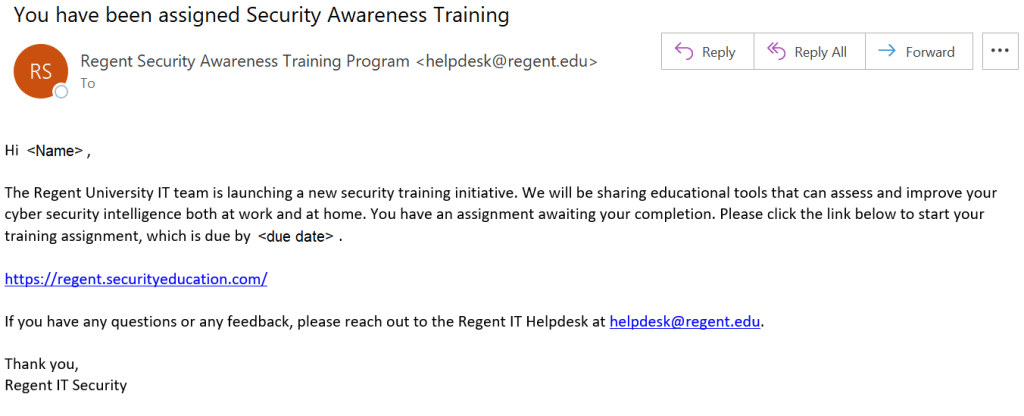
Reminders may be sent from the same address (“Regent Security Awareness Training” <helpdesk@regent.edu>).
All assigned training can be accessed here: https://regent.securityeducation.com.
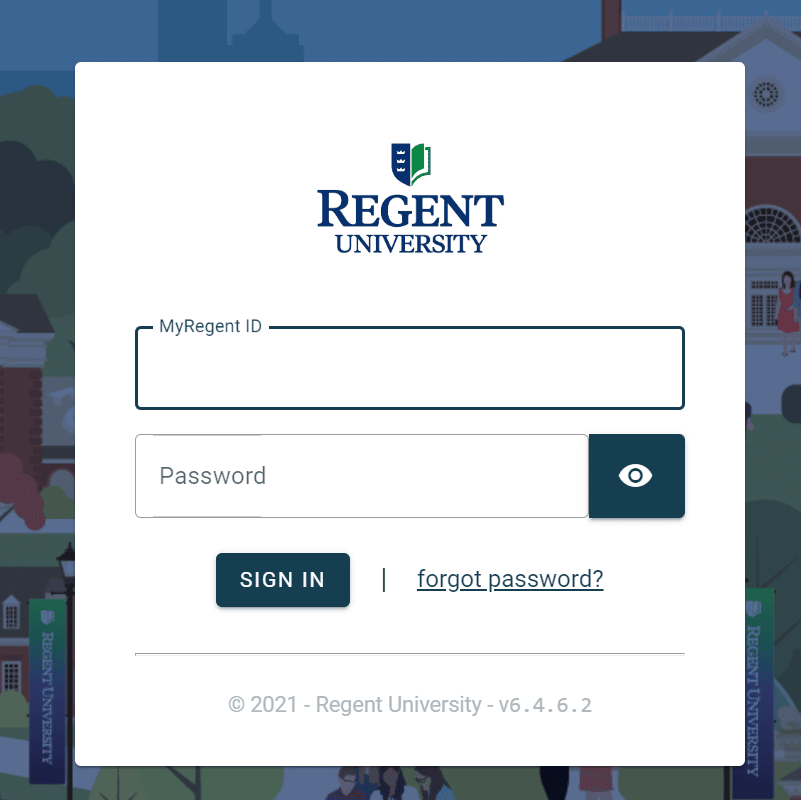
Please expect to be prompted for the standard Regent University Single Sign-On page as shown below.
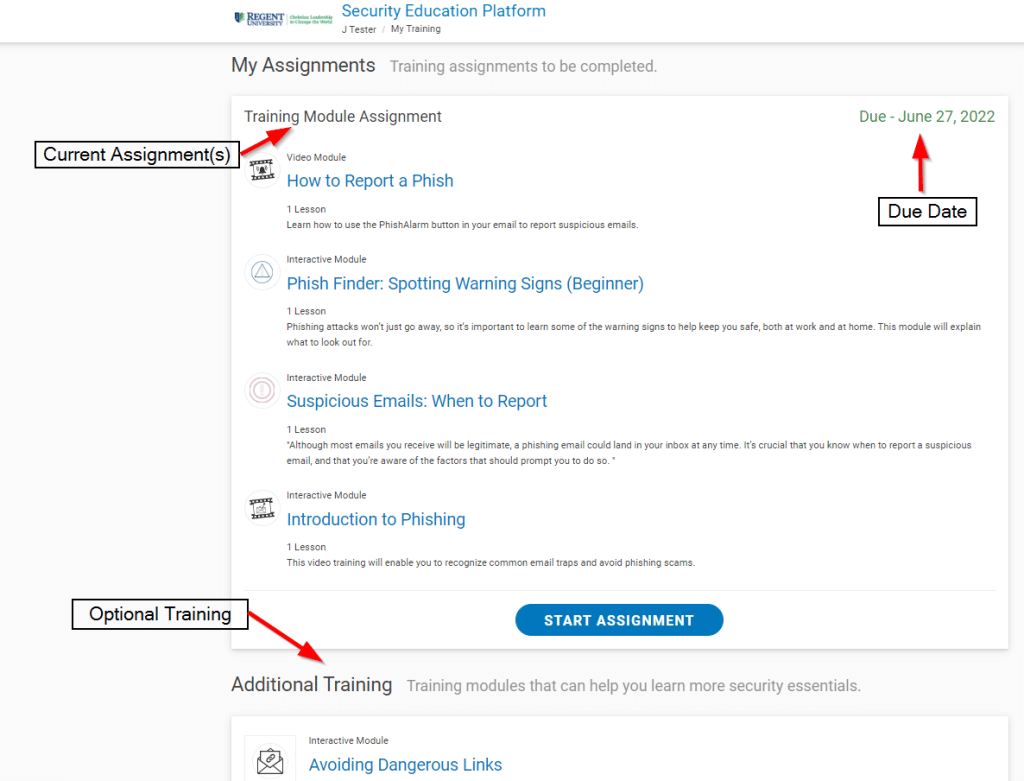
The training portal will appear as follows:
As part of the Security Awareness program focused on Email Phishing attempts, mock phishing messages may be sent at any time to assess individual awareness.
The included training will help you identify suspicious or potential phishing messages.
When you think you have found a phishing email, simply use the “Report Phish” button included in Outlook to report it.
Program Requirement
Privacy and Security are no longer an option in our educational system. Security Awareness is essential for everyone’s work habits, both on and off-campus. Regent University is required by several of our accreditation and auditing bodies to have an annually audited Security Awareness Training program with full participation. This program is mandatory.
In simplest terms, Password Security is the process of choosing a difficult to guess password, then keeping it a secret. Since your password/s are the primary protection mechanism for your accounts, a poorly chosen (weak) password may result in compromise of personal user information and possibly confidential Regent University information. As such, all Regent University faculty, staff, and students (including visitors, contractors, and vendors with access to Regent University systems) are responsible for taking appropriate measures to select and secure their passwords.
Attackers can use programs to compromise easily guessed passwords. When an attacker has access to your accounts, then he/she may inherit access to your private information and/or confidential Regent University information. Because of this, the IT department has adopted more strenuous password complexity requirements. Your new password will make it more difficult for an attacker to compromise your accounts. Remember, your password can be super difficult to guess, but if you share it with anyone, you’ve already compromised your accounts. So choose a difficult to guess password, then keep it a secret.
At Regent, we now have a few new requirements to make sure that our users create what we call ‘Strong Passwords’. These are passwords that an imposter could not easily crack. Your new password must:
- Be at least fourteen (14) characters in length
- Contains at least one upper case letter (A-Z)
- Contains at least one lower case letter (a-z)
- Contains at least one number (0-9)
- Contains at least one special character (!*-._+:?[\]^~)
- Be different than your other passwords
- Not be based on personal information, names of family, etc.
A good way to create a strong password is by using a ‘Pass Phrase’. These use something that you can easily remember, such as a Bible verse or song lyric, instead of a random string of characters. Pass phrases are typically stronger and easier to remember than a traditional password. Take the following example for instance.
Phrase: “Regent University, Christian Leadership to Change the World!”
We could certainly break this phrase up or use the whole phrase to create a strong password. For this example, let’s use part of the phrase along with numeric and special characters to meet the complexity requirement.
Christian-Leadership-2-Change-the-World!
Great! It meets all of our requirements. It has at least fourteen characters, upper and lowercase letters, a number, and special characters. Here are some other examples of strong passwords formed from phrases:
Phrase: “John 3:16, For God so Loved the World”
Possible Passwords:
4_God_so_Loved_the_World
John+3:16+For+God+so+Loved+the+World
God^so^Loved<3the^World
Phrase: “Peas and Carrots”
Possible Passwords:
P3as[and]C4rrots
Pea5+and+Carr0ts
8Peas~AND~2Carrots
In each of these examples, the chosen passwords meet the University guidelines for minimum password criteria. Also, each password is not based on any personal information.
Now pick a phrase for yourself. Maybe a Bible verse, famous quote, or anything you like. Remember, don’t use words or phrases that others may think you will use. Don’t make it easy for someone to guess your password!
Passwords are personal information that should never be shared with any other person, including, but not limited to, instructors, assistants, staff (including IT staff), or supervisors. You should never send passwords via email, as this is an insecure medium. You should avoid writing down passwords and/or storing them in an insecure place. You should also never store passwords in plaintext on your computer (in a file, document, excel sheet, etc.)
You SHOULD use a strong and unique password for every website and service that you use – this means that the password you use for your Regent ID should NOT be used anywhere else. This is especially true for free services, where a breach in their security can expose your credentials if you happened to sign up with your Regent email.
We recommend that you use a unique password for every site and service that you use, and to try and avoid using your Regent work email to sign up for personal services.
This adds up to a lot of passwords, and you should not be storing them in a local file or even letting your browser store your passwords for you.
What is a good way to handle all these passwords? A password manager. There are several free and paid options that use robust encryption so secure your entire password database with a single (strong) Master Password. There are locally-managed versions and cloud versions; generally the cloud version offers an easier-to-use experience as you do not need to worry about accessing your password database from wherever you happen to be.
As of Fall 2023, Regent IT recommends BitWarden as a solid peer-reviewed option. The free plan is more than sufficient for personal use.
Other options include:
LastPass used to be a strong contender, however a recent major breach has undermined their security reputation.
Just as your Regent ID is secured with 2 Factor Authentication, it is a good idea to secure your password manager database with a second factor.
Users should contact the Help Desk at 757.352.4076 or helpdesk@regent.edu if you forget your password. The Help Desk has the ability to reset your password to a temporary value.
NOTE: Regent IT will NEVER ask you to provide your password either over the phone or by email. Once given the temporary password, you should set a new strong password using the password reset page as soon as possible.
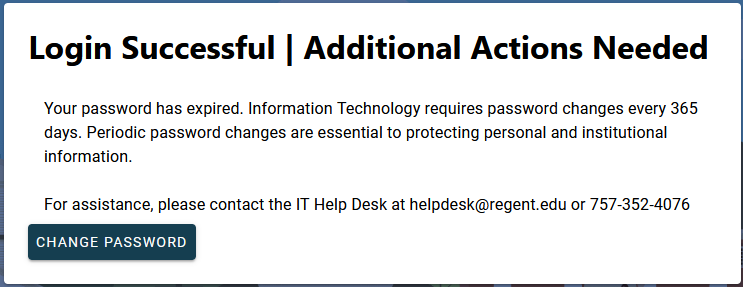
Regent University requires everyone to change their password at least once per year (365 days). If you have reached this limit you will see the following message when logging in to the MyRegent Portal:
If at any time you suspect that your password has been shared or compromised, you should immediately change that password anywhere it may have been used.
Our password change process will check each new password to make sure that it meets our new requirements. If it doesn’t, you’ll have to try again. To help reduce the chances of getting rejected, make sure that you’ve satisfied the following checklist.
- Understand why passwords and secrecy are important
- Understand which kinds of characters your password MUST include
- Understand which kinds of characters your password must NOT include
- Have chosen a good phrase to base your password on
- Make sure your password meets the complexity requirements
Start the three-step process now if you are ready to change your password.
Regent University provides Antivirus software to all managed workstations and laptops. If you believe your Regent computer does not have Antivirus software on it or the definitions are out-of-date, call the Help Desk immediately.
You should have an Antivirus program running on your personal computers as well. Here is a list of vendors to choose from:
- Fee Based Antivirus Programs
- Free Antivirus Programs
The Federal Trade Commission provides useful Consumer Information on how to protect yourself online.
Symantec Security Response provides detailed information about current threats and how to protect your computer.